You've diagnosed a dead Hisense TV. The power board is fine (standby light works, voltages check out), but the TV won't boot, keeps restarting, or shows a frozen logo. You need a new mainboard—also known as the motherboard or logic board.
Here is the trap that catches 90% of repairers:
Your TV model number (e.g., 55U7H, 43A6G) is NOT enough to buy a replacement board.
Hisense uses multiple different mainboards for the same TV size and series. If you buy based on the chassis model alone, you will likely receive an incompatible board that results in a scrambled picture, inverted colors, or no display at all.
You need the RSAG Part Number. This guide shows you exactly where to find it.
What is the RSAG Number?
RSAG stands for Reference Standard Assembly Group—Hisense's internal coding system for printed circuit board assemblies (PCBAs).
- Format example:
RSAG7.820.12345orRSAG7.820.12345/ROH - Why it matters: This number encodes the exact firmware, connector layout, voltage regulator configuration, and panel driver compatibility.
Two mainboards with different RSAG numbers may look identical but will not function correctly in your TV.
Step 1: Ignore the Sticker on the Back of the TV
The silver or white sticker on the plastic back cover contains the commercial model number (e.g., 55U68G). This is for retailers and consumers. It tells you nothing about the mainboard inside.

A close-up of the silver rating label on the back of a Hisense TV. The commercial model number is clearly visible, but there is no RSAG number.
Do not order a board using this number alone. You will regret it.
Step 2: Open the TV (Safely)
You must access the internal mainboard to read the RSAG number.
⚠️ Safety First: Unplug the TV for at least 30 minutes before opening. The power supply board capacitors can hold dangerous voltage.
Tools needed: Phillips screwdriver (#1 or #2), a soft surface (blanket or foam pad), and good lighting.
- Lay the TV face-down on a soft blanket.
- Remove all screws securing the plastic back cover.
- Lift the cover off gently (watch for attached wires or clip tabs).
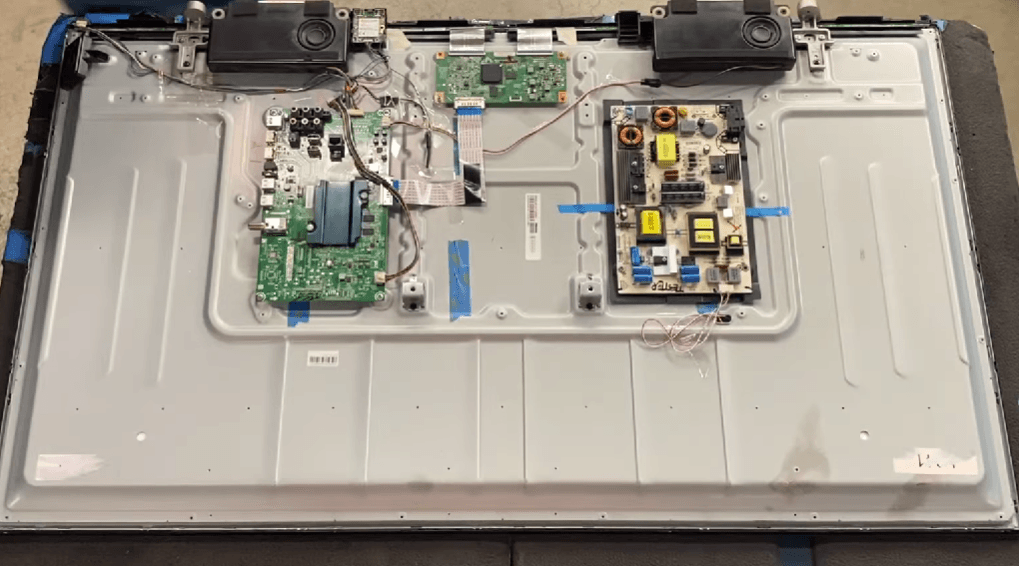
Annotated wide shot of the inside of a Hisense TV.
Step 3: Locate the Mainboard
The mainboard is the board where all external inputs connect to:
- HDMI ports
- USB ports
- Antenna/Cable input
- AV jacks
- Optical audio out
It is usually mounted vertically on the left or center of the TV (when viewed from the back). It connects to:
- The power board (via a flat multi-wire cable)
- The T-Con board (via ribbon cables)
- The panel (via thin flex cables)
Step 4: Find the RSAG Number (Three Possible Locations)
The RSAG number appears on a white barcode sticker directly on the mainboard's green PCB. It is never on the TV chassis.
Location A: The Large White Sticker (Most Common)
Look for a rectangular white label with multiple barcodes. The RSAG number is usually printed in bold black text at the top or bottom of this sticker.
Example label text:
RSAG7.820.12345
SERIAL: 123456789012345
DATE: 2023.05.12

Macro shot of the white sticker. The RSAG number is highlighted in a white text color.
Location B: Etched or Silk-Screened on the PCB
If the white sticker is missing or damaged, look for the RSAG number etched directly into the copper layer or printed in white ink on the green circuit board itself.
- Check the edges of the board (top or bottom).
- Look near the mounting screw holes.
- Search around the center of the board between large chips.
Example etching: RSAG7.820.115667/ROH
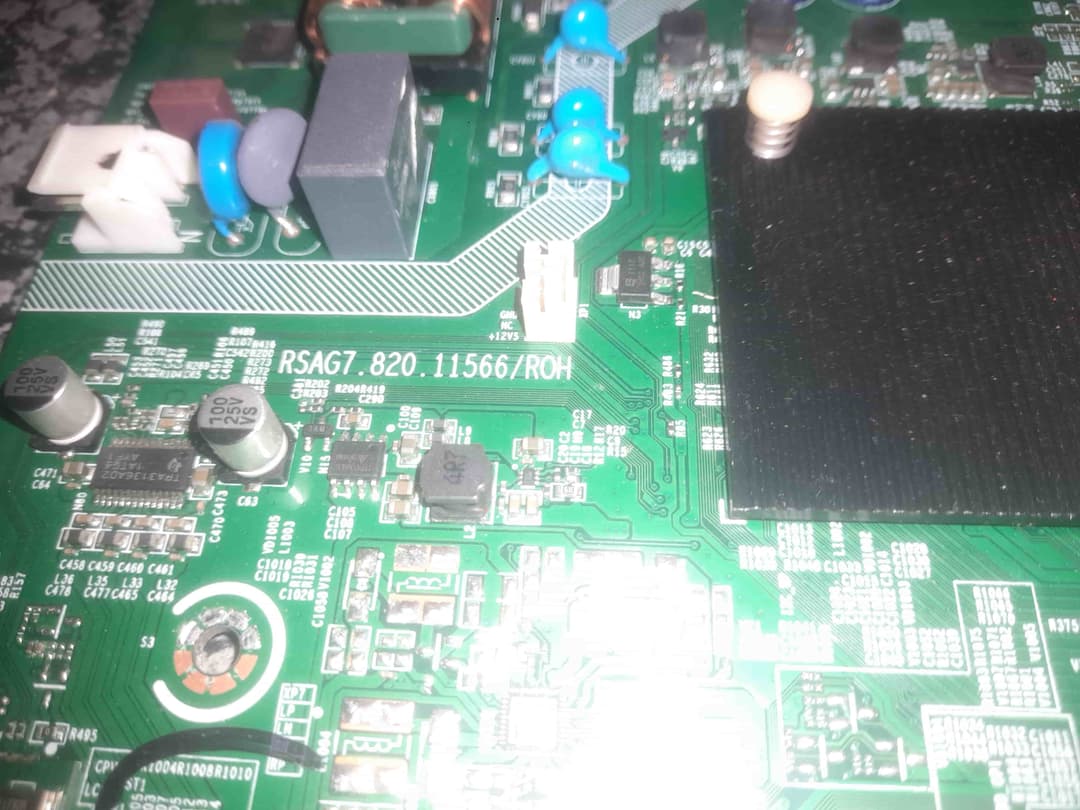
A close-up showing white silk-screen printing on a green circuit board.
Location C: The Revision Number (Critical!)
After the main RSAG number, you may see a revision number (e.g., /ROH, REV 1.0, VER B).
| Revision Suffix | Compatibility |
|---|---|
| No suffix | Original version |
| '/ROH' | RoHS compliant (lead-free solder) – usually interchangeable with non-ROH |
| 'REV 1.0', 'REV 2.0' | **NOT interchangeable** – different component layouts |
| 'VER A', 'VER B' | **NOT interchangeable** – different firmware |
Critical: A RSAG7.820.12345 REV 1.0 and a RSAG7.820.12345 REV 2.0 are NOT compatible. Always match the revision number exactly.
Step 5: Document Everything Before Ordering
Once you have the RSAG number, write down these additional details (they help confirm compatibility):
- Full RSAG number (including
/ROHor revision) - TV model number (from the back sticker) – for cross-reference
- Panel model number (often printed on a sticker on the metal LCD frame)
- A clear photo of your mainboard (top and bottom if possible)

Side-by-side comparison of two similar Hisense mainboards with different RSAG numbers and different connector layouts
Why Model Numbers Fail: A Real Example
| TV Model | Possible Mainboards | Result if Wrong |
|---|---|---|
| Hisense 55U7H | RSAG7.820.12345 (REV 1.0) | Correct |
| Hisense 55U7H | RSAG7.820.12345 (REV 2.0) | No picture or scrambled image |
| Hisense 55U7H | RSAG7.820.99999 (different board) | TV won't turn on' |
The same TV model rolled off the production line with three different mainboard suppliers depending on the month of manufacture. Only the RSAG number tells you which one you have.
Common Mistakes to Avoid
❌ Using the TV model number from the back sticker – This is the #1 cause of returns.
❌ Reading the serial number instead of the RSAG number – The serial number is longer and unrelated.
❌ Matching only the first 5 digits – RSAG7.820.12345 and RSAG7.820.12399 are different boards.
❌ Ignoring the revision letter – REV A and REV B are not interchangeable even if the base number matches.
✅ The correct method: Match the full RSAG number including revision exactly.
My Mainboard Sticker is Missing or Damaged
If the white sticker is torn off or illegible, and the etching is worn away:
- Check the T-Con board (the smaller board connected directly to the screen). Sometimes the T-Con sticker has a cross-reference.
- Search by your TV model + panel model number (on the metal LCD frame). This narrows it down to 2-3 possible boards.
- Contact us with clear photos of your mainboard (both sides). Our technicians can identify the correct RSAG number from component layout and connector positions.
Where to Buy a Certified Hisense Mainboard
You've done the hard work of identifying the correct RSAG number. Now get a board that actually works.
We stock certified, pre-tested Hisense mainboards for every RSAG prefix:
- ✅ RSAG7.820.xxxxx (most common)
- ✅ RSAG7.826.xxxxx (newer models)
- ✅ RSAG2.908.xxxxx (older chassis)
- ✅ Each board is tested for HDMI ports, USB, boot sequence, and panel output
- ✅ 90-day warranty on all replacement boards
Browse our Hisense Mainboard Inventory by RSAG Number →
Can't find your RSAG number in our catalog?
Use the chat widget below. Send us a photo of your mainboard. We will identify the correct RSAG number and check stock within 2 hours.
Final Checklist Before Ordering
| Task | Done |
|---|---|
| TV unplugged and back cover removed | ☐ |
| Located the mainboard (where HDMI ports connect) | ☐ |
| Found the white sticker OR etched number on the green PCB | ☐ |
| Written down the full RSAG number (e.g., RSAG7.820.12345/ROH) | ☐ |
| Noted the revision number (REV 1.0, VER B, etc.) | ☐ |
| Taken a clear photo of the board for reference | ☐ |
| Searched our catalog using the **full RSAG number only** | ☐ |
Still Unsure? We Identify Boards for Free
DIY repair shops and individual techs: stop guessing and buying the wrong board. Send us your photos.
WhatsApp: +27 66 446 6542 – Send a photo of your mainboard.
Email: info@nativeelements.co.za – Subject: "RSAG Identification Request"
We reply within one business day with the exact RSAG number and a link to purchase the correct replacement. Alternatively, you can visit Tech and Bids to search for your board model number.
Don't let a wrong mainboard turn a 20-minute repair into a month of returns. Match the RSAG number. Match the revision. Get your Hisense TV working again.
Experiencing a similar issue? Contact us for a no-obligation quote. We're here to help.