Load shedding and unstable grid transitions are a predictable part of South African life. However, nothing halts a household or business faster than checking your backup system during a power cut only to realize your batteries are completely flat or refusing to take a charge.
If your recent solar inverter troubleshooting has landed you on a frustrating discovery—the system is powered on, but the charging indicator remains stagnant—you are not alone. In SA's harsh power climate, inverters and batteries are pushed to their absolute operating limits. Extreme municipal voltage spikes, intense heat, and erratic state changes take a heavy toll on power electronics.
Before you panic and search for an emergency inverter repair South Africa service, let’s look at the most common reasons why your inverter isn't charging. This guide will help you diagnose if you are dealing with a simple configuration glitch that can be fixed with a basic reset, or a deeper internal fault requiring a professional bench assessment.
1. The 'Deep Discharge' Trap (Dead Battery Protection)
One of the most frequent reasons a solar system stops charging—especially after consecutive, prolonged blocks of load shedding or a stormy week—is that the battery bank has dropped below its Low Voltage Cut-Off (LVCO) threshold.
When a modern lithium-ion (LiFePO4) or deep-cycle gel battery discharges too deeply, its internal Battery Management System (BMS) or safety relay disconnects the cells to prevent permanent thermal or chemical damage.
The Symptom
- The inverter display shows a generic battery communication error (e.g., BMS Warning or No Battery Connected).
- The battery's actual voltage reads abnormally low (e.g., under 40V on a standard 48V configuration).
- The inverter completely bypasses the battery circuit and treats it as non-existent.
How to Fix It
Because the BMS has entered lockdown mode, the battery cannot output a voltage signal. Without detecting this voltage signal, most hybrid inverters will refuse to send a charging current to the terminals. To fix inverter battery issues caused by deep discharging:
- Activate Force-Charge Modes: Check your inverter's advanced menus. Modern units often feature a "Battery Wake-Up" or "Force AC Charge" setting designed specifically to push a low-amperage current into dormant lithium cells until the internal BMS reactivates.
- Professional Jump-Starting: If the built-in wake-up utility fails, a specialized technician must isolate the battery bank and use an external, manual DC bench charger to safely raise the core voltage back into an operational window where the inverter can take over again.
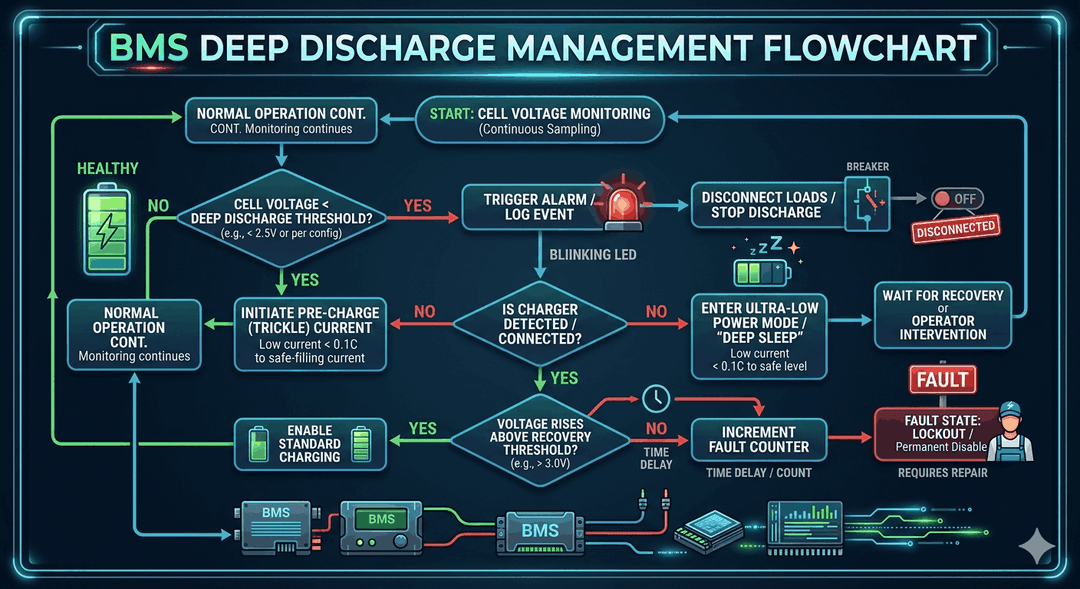
Infographic detailing how a lithium-ion BMS enters protection mode when voltage drops below the safe threshold
2. Grid-Tie Voltage Bounds and Local Supply Disconnections
Sometimes the charging failure has absolutely nothing to do with faulty hardware. Instead, it is caused by a strict safety mismatch between your inverter's protective parameters and the unstable power arriving from Eskom or your local municipality (such as City Power, City of Cape Town, or eThekwini).
Following an outage or a load shedding block, power grid restoration is frequently accompanied by massive transient voltage surges. The incoming power might spike well over 255V or sag below 180V.
The Symptom
- Your home has active municipal grid power, but the inverter’s "Grid" or "AC" indicator light flashes indefinitely rather than turning solid.
- The system continues running exclusively on solar panels or remaining battery power, completely ignoring the available utility line to charge.
Why It Happens
Your hybrid inverter is programmed with highly conservative safety standard windows. If the incoming grid voltage or frequency fluctuates outside of acceptable parameters (typically 190V–250V AC / 49Hz–51Hz), the inverter will refuse to synchronize with the grid to protect your home's appliances. If this occurs during a scheduled grid-charging window or during peak usage timers, your batteries will remain uncharged.
How to Diagnose and Reset
- Check your inverter’s live LCD telemetric data or monitoring app. Locate the live AC Input Voltage reading. If it reads an extreme number (e.g., 258V), the inverter is functioning correctly by rejecting unsafe power.
- If the voltage appears to have stabilized but the system remains stuck, perform a safe AC reset: Switch off the main inverter input/bypass breaker on your distribution board, wait 2-3 minutes for the internal capacitors to fully drain, and switch it back on to force a clean re-synchronization cycle.
3. Deciphering Inverter Fault Codes
When an internal electronic error occurs, your system will usually emit a continuous audible beep and display an explicit error code on the panel. While exact alphanumeric codes vary across major brands in South Africa (such as Deye, Sunsynk, Growatt, or Luxpower), they generally cross-reference into identical diagnostic behaviors:
| Common Fault Category | Typical Brand Codes | What It Means | Can You Reset Safely? | Immediate Action Required |
|---|---|---|---|---|
| Over-Temperature Fault | Fault 02, E4, F02 | The internal heatsink or switching core has exceeded safe thermal limits (typically >85°C). | **Yes**, after a cool-down window. | Clear any dust blockages from intake vents. Verify the room's ventilation. If cooling fans are physically seized, they require an on-site swap. |
| BMS Comm Timeout | Fault 20, F56, E04 | The control board and the lithium battery can no longer communicate via the CAN/RS485 data line. | **Yes**, check cable seating. | Power down the system, clear and reseat the data cable ends, check that battery DIP switches align with your manual, and reboot. |
| DC Over-Current / Short | Fault 08, F13, E07 | A major electric surge or a catastrophic hardware short has occurred along the battery or DC bus. | **No.** High danger of arc flash. | Do not clear or reset. Immediately switch off your battery isolator and request a professional field assessment. |
| Bus Voltage Too High | Fault 03, F08, E01 | Internal system capacitors have overcharged, typically caused by close-proximity lightning or sudden grid spikes. | **No.** Severe hardware damage. | Requires component-level bench repair to replace shorted MOSFETs or damaged surge varistors. |
4. Tripped DC Isolators or Blown Fuses
Per the strict safety regulations of SANS 10142-1, every standard South African solar installation must incorporate robust overcurrent protection between the battery bank and the inverter chassis. This comes in the form of a heavy-duty DC circuit breaker or high-rupture capacity (HRC) fuses housed within an external disconnect box.
When power switches abruptly during heavy load shedding cycles, large household start-up currents (such as a borehole pump, automated geyser, or air conditioner trying to kick over while the grid cuts) can pull an immense, instantaneous current from the battery bank.
The Symptom
- The inverter functions perfectly under direct PV solar generation or stable grid power, but displays a
0%battery capacity status or a "Battery Open Circuit" alarm. - The physical switch on the front of the lithium battery pack is turned on, but absolutely no current flows into or out of the unit.
How to Inspect safely
- Walk over to your external DC isolator box (located on the wall directly between your battery bank and inverter input).
- Look to see if the large molded case breaker toggle has tripped to the center or down OFF position.
- If it has tripped, turn off your home's heavy appliances, flip the DC breaker back firmly to ON, and observe if the inverter establishes communication and begins its charging cycle.
⚠️ Important Safety Note: If the DC breaker trips instantly a second time when flipped on, do not force it. A repetitive trip points directly to a severe dead short inside the inverter's charging module or within the battery wiring. Forcing a faulted breaker can cause permanent arc-flash damage.
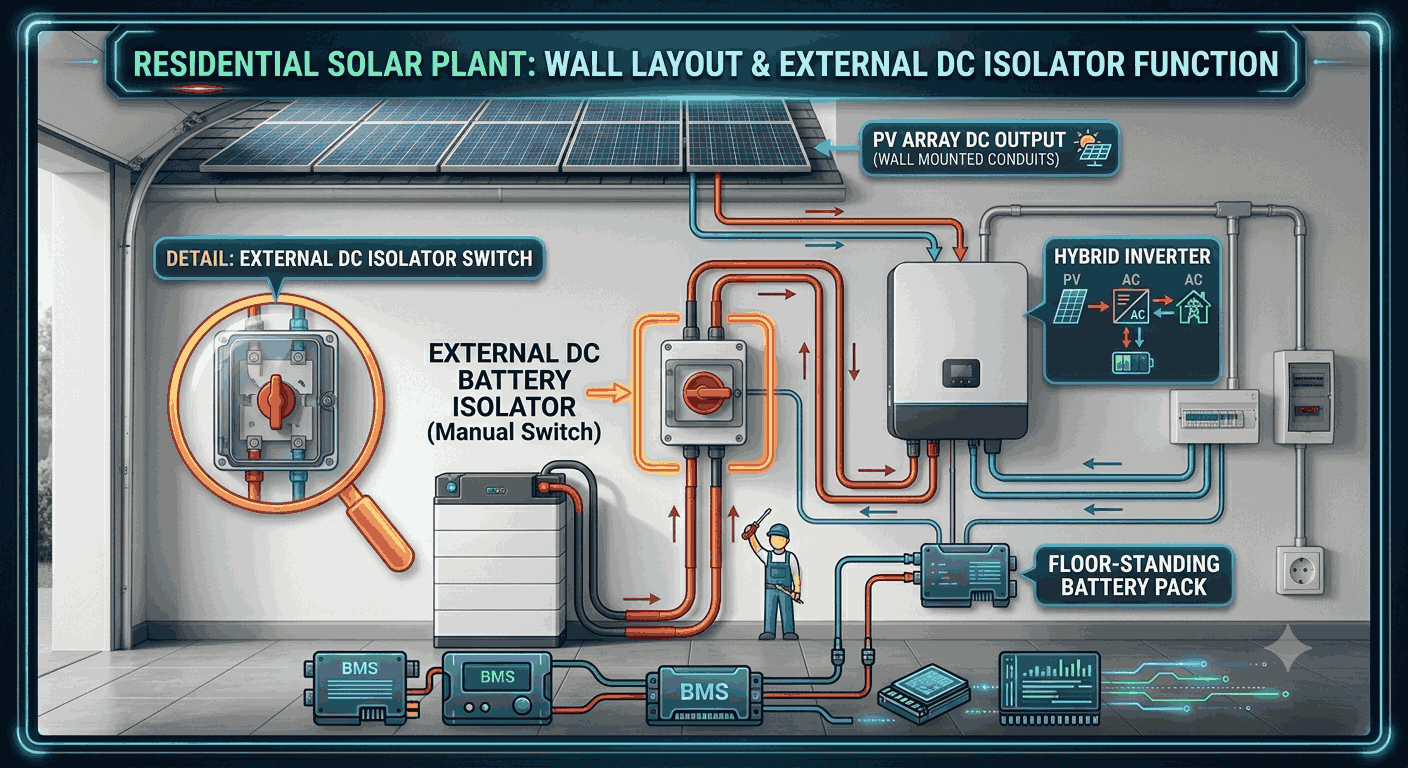
A standard residential solar plant wall layout, showing the exact location of the external DC isolator box situated between the floor battery and the hybrid inverter.
When to Book an Inverter Repair in South Africa
If you have confirmed that your external DC breakers are up, your municipal line voltage is steady, your battery data communication cables are firmly seated, and a full system cold boot has failed to clear the charging fault, you are likely looking at an internal hardware component failure.
Modern solar inverters are highly intricate high-frequency power electronics. Their internal charging paths rely on an array of fast-switching transistors (IGBTs or MOSFETs), internal isolation relays, and control microprocessors. Under South Africa’s high ambient operating temperatures and continuous cycling habits, these internal parts can degrade over time.
Clear Indicators of Critical Component Failure:
- The inverter repeatedly emits rapid clicking noises or high-pitched humming sounds but fails to switch on the charging circuit.
- There is a distinct smell of burnt electrical insulation or visible smoke venting from the chassis.
- The system displays permanent internal hardware faults (such as a constant Inverter Relay Short or DC Bus Failure) that persist even when all inputs are completely isolated and restarted.
Safety First: DC electricity from solar panels and lithium storage systems carries incredibly high fault currents. It does not behave like standard household AC power and poses severe arc-flash and electrical fire risks. Never open the primary chassis cover of your inverter or attempt to test internal circuit components yourself.
Always look for an experienced electronic technician who can safely isolate your plant, perform deep diagnostic tracking with proper test equipment, and handle component-level repairs to get your backup infrastructure safely back online.
Experiencing a similar issue? Contact us for a no-obligation quote. We're here to help.